Cyberdefense Strategies
Security Principles
Shift Left

Basic concept: Security should not be an afterthought; it should be considered at the very start of all IT-related activities.
The term "shift left" refers to moving security considerations earlier in any process - whether that's software development, system design, or business planning.
Building a Security Culture
Technology alone cannot provide complete protection. Organizations must also focus on:
Security awareness training: Regular education about current threats and best practices Clear policies: Well-defined security policies that are communicated and enforced Incident reporting: Encouraging employees to report suspicious activities Continuous improvement: Regular review and update of security practices
What does "shift left" look like for different IT professions?
Software developers:
- According to NIST: The cost of correcting a software vulnerability during the development phase is approximately 30-60 times less than the cost of fixing the vulnerability after the program has gone to production
- Implement security reviews during code development
- Use automated security testing tools
- Follow secure coding practices from project start
Let's take a look at the security alerts for this application:
*Note: Only instructor can see this - has to be logged in.
System administrators:
- Design security into system architecture
- Implement security controls during initial setup
- Plan for security monitoring from day one
You may hear the term application architecture in the context of a software system. This refers to how all of the pieces that make up the overall application fit together.
Some examples of incorporating security at the system architecture level include:
-
Minimizing the attack surface of the applicaition
by...
- Only exposing (opening up for public Internet communication) parts of the application that need to be open to the public.
-
Minimizing the blast radius by...
- Using short lived tokens for authentication, so that any attacker who somehow obtains a compromised authentication token only has a short window to launch an attack.
Business analysts:
- Communicate with the teams building software to ensure that security best practices are understood.
- Include security requirements in initial project specifications
- Consider security implications during business process design
Principle of Least Privilege
Principle of Least Privilege = Users and systems should be given only the minimum levels of access needed to perform their job functions.
Examples:
- Role Based Access Control (RBAC)
- UI should not make visible functionality that users of a particular role don't need to see.
- Protected pages should show as "not found" to unauthenticated users, or reroute to login page.
- Database admin vs read/write vs readonly user
Technical Controls
Hashing and Encryption
Two fundamental cryptographic technologies that serve different purposes in cybersecurity.
Key Differences Between Hashing and Encryption
| Aspect | Hashing | Encryption |
|---|---|---|
| Purpose | Verify integrity | Protect confidentiality |
| Reversible | No | Yes (with key) |
Hashing
Purpose: Verify the integrity of data (ensure it hasn't been changed).
How it works: Converts data into a fixed-length string (hash) that uniquely represents the original data. The process cannot be reversed.
Use cases:
- Storing passwords securely
- Verifying file integrity
- Digital signatures
- Detecting unauthorized changes to data
Hashing Demonstration
# Create two files with very similar content
echo "Data to be hashed." > file1.txt
echo "data to be hashed." > file2.txt

# Generate MD5 hashes - note how different they are
md5sum file1.txt
md5sum file2.txt

# Show that even identical files produce identical hashes
cp file1.txt file1_copy.txt
md5sum file1.txt file1_copy.txt
Key takeaway: Even tiny changes in data produce completely different hashes, making it easy to detect if data has been modified.
Encryption
Purpose: Protect data from unauthorized viewers during storage or transmission.
How it works: Converts readable data (plaintext) into unreadable data (ciphertext) using a key. The process can be reversed with the correct key.
Use cases:
- Protecting sensitive files on disk
- Securing data transmitted over networks
- Protecting backups and archives
- Securing communications (email, messaging)
Encryption Demonstration
# Create a sample file
echo "This is confidential data." > confidential.txt

# Encrypt the file using GPG
gpg -c confidential.txt

# Remove the original unencrypted file
rm confidential.txt

# Show that the encrypted file is unreadable
cat confidential.txt.gpg

# Decrypt the file back to readable format
gpg -o confidential.txt -d confidential.txt.gpg
cat confidential.txt
Key takeaway: Encryption makes data unreadable without the proper key, but it's reversible.
Digital Signatures
Digital signatures are a way to verify the authenticity of data - whether the data was created by the person or entity that claims to have created it.
Tokens are a way to pass data between the client (web browser) and server (web application). The token is essentially a message that has a tampering detection mechanism built in.
Imagine that you have a website that requires a login. Here's how it works:
- User logs in with username and password
- Server creates a token with user information (like roles and permissions)
- Server signs the token (creates a hash using its own secret key)
- Client stores the token and sends it back to the server every time that it requests a page from the site
- Server verifies the signature to ensure the token hasn't been tampered with
The server might then, as with Role Based Access Control, check the token to see if the user has the appropriate permissions to access the requested page.
Key point: Only the server with the secret key can create a valid signature and check whether its original contents have been tampered with.
Daily Quiz 1: JSON Web Tokens
In this exercise we will visit jwt.io. We will create a JWT token and see how tampering detection works.
- On the "JWT Encoder" tab, enter the following information into the "Payload" area:
{
  "id": "123",
  "name": "Awesome User",
  "admin": false
}
Copy the text from the "JSON WEB TOKEN" area on the right. This is the signed token that was generated with the server's secret key in the "SECRET" area.
- On the "JWT Decoder" tab, paste the token you copied in the previous step into the text area. You should see the three fields from step 1.
What this is showing is that the client can send this token to the server, and it can both reassemble the original information and tell that nothing has been changed. We see the message "Signature Verified".
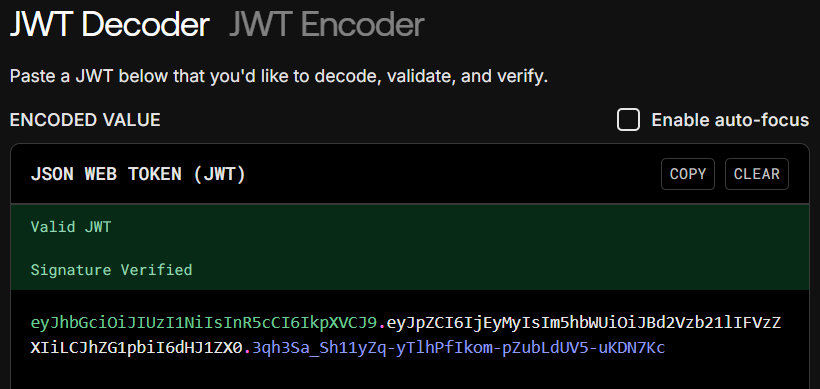
Take a screenshot of this section.
- Now let's try to tamper with the token. Even though the text from the original token isn't human readable by default, it's very easy to see the information in plaintext using tools like this one.
The snippet below is an altered version of the original token that
sets the
admin field to true. This represents a
malicious user trying to gain elevated privileges.
Copy and paste this into the "JSON WEB TOKEN" area on the "JWT Decoder" tab.
eyJhbGciOiJIUzI1NiIsInR5cCI6IkpXVCJ9.eyJpZCI6IjEyMyIsIm5hbWUiOiJBd2Vzb21lIFVzZXIiLCJhZG1pbiI6dHJ1ZX0._tStqR0CWzn2KzGKA-NGyJGIN92dasCzQoarfR4mEnENote that the "DECODED PAYLOAD" section shows the tampered information; however the "Signature Verified" message is now "Invalid Signature".
This is because the web server again uses its secret key to verify the signature. It can tell that the information, when hashed with its secret key, does not match the signature in the token. Even a tiny change to the data creates a completely different hash, just like we saw in our earlier hashing demonstration.
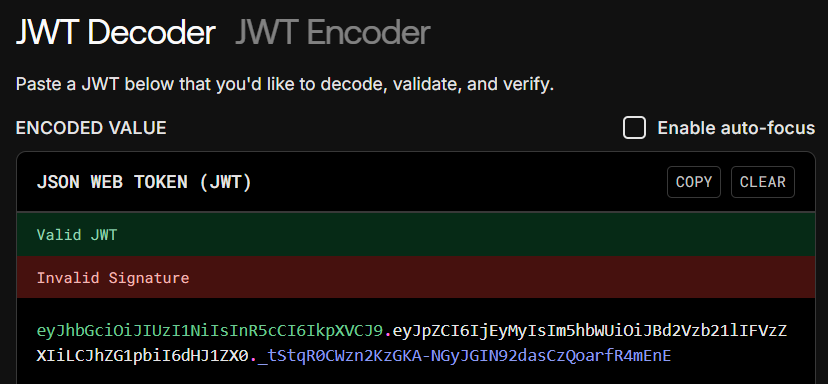
Take a screenshot of this section.
User and Group Permissions
File and directory permissions are a fundamental security control that determines who can access what resources.
Basic permission types:
- Read (r): View file contents or list directory contents
- Write (w): Modify file contents or create/delete files in directory
- Execute (x): Run a file as a program or enter a directory
When might we want to make a file read-only? Read/write? Executable?
Permissions Demonstration
The Linux permissions model breaks the permission for each file into three parts:
- Owner (first number)
- Group (second number)
- Other (third number)
Windows also has the concept of "read-only" files. We can check if a file is read-only by right clicking on it and selecting "properties".
# Create a sample file and check its permissions
echo "Sensitive company information" > sensitive.txt
ls -l sensitive.txt

# Make the file read-only for everyone
chmod r--r--r-- sensitive.txt
ls -l sensitive.txt

# Try to modify the file - this should fail
echo "Additional data" >> sensitive.txt

# Restore write permissions to demonstrate the concept
chmod rw-r--r-- sensitive.txt
echo "Additional data" >> sensitive.txt
cat sensitive.txt
Key takeaway: Proper permissions prevent unauthorized access and modifications to critical files.
Active Threat Monitoring
Threat Intelligence
Threat intelligence = Evidence-based knowledge about current and emerging security threats, including their context, mechanisms, indicators, implications, and action-oriented advice.
Using CISA Resources
The Cybersecurity and Infrastructure Security Agency (CISA) provides free threat intelligence and security advisories to help organizations stay informed about current threats.
Daily Quiz 2: CISA Advisory Analysis
Do this on your own, then we will discuss the answers together.
Analyze the following advisory: ICS-25-196-03
-
Device/System Type: What kind of device or system is targeted by this vulnerability? (e.g., personal computing devices, corporate computing systems, industrial control systems, etc.)
-
Vulnerability Description: What is the actual vulnerability (the problem with the software/device)?
-
Exploit Difficulty: Which part(s) of the advisory tell us how difficult it would be for an attacker to exploit this vulnerability?
-
Attack Consequences: What are the potential consequences if this vulnerability is successfully exploited?
-
Mitigation Strategy: What is one mitigation strategy listed that could defend against this attack?
Implementing a Comprehensive Defense Strategy
Layered Security (Defense in Depth)
Effective cybersecurity requires multiple layers of protection:
Physical layer: Secure facilities, locked server rooms, badge access Network layer: Firewalls, intrusion detection systems, network segmentation System layer: Antivirus software, system hardening, patch management Application layer: Secure coding, input validation, application firewalls Data layer: Encryption, access controls, data classification Human layer: Security training, awareness programs, clear policies
Security Monitoring and Incident Response
Continuous monitoring is essential because:
- New threats emerge daily
- Attack techniques constantly evolve
- Systems and configurations change over time
- Early detection reduces impact
Key monitoring activities:
- Log analysis: Review system and security logs for suspicious activity
- Vulnerability scanning: Regular checks for known security weaknesses
- Threat hunting: Proactive searching for signs of compromise
- Security metrics: Track security performance and improvement over time
Key Takeaways
Effective cybersecurity defense requires:
- Early integration: Implement security from the beginning (shift left)
- Appropriate access: Give users only the access they need (least privilege)
- Strong technical controls: Use encryption, hashing, and permissions appropriately
- Active monitoring: Stay informed about current threats and vulnerabilities
- Layered approach: Implement multiple complementary security measures
- Organizational commitment: Build security into company culture and processes
Remember: Security is not a destination but an ongoing process that requires constant attention, adaptation, and improvement.